Toyota Yaris Forums - Ultimate Yaris Enthusiast Site


Go Back   Toyota Yaris Forums - Ultimate Yaris Enthusiast Site > Technical Forums > In Car Entertainment + Electronics (audio / video / alarm)
  The Tire Rack

Reply
 
Thread Tools Display Modes
Old 05-21-2011, 03:45 PM   #379
SKurj
 
Drives: 09 Yaris 3dr HB, BRZ
Join Date: Mar 2011
Location: GTA
Posts: 222
Ok one tiny issue...

The spectrum doesn't work.. well the screen is displayed but nothing moves i can switch between the 2 modes but none of the indicators move.
SKurj is offline   Reply With Quote
Old 05-22-2011, 10:42 AM   #380
hackenfort
 
Drives: 10 yaris
Join Date: Mar 2011
Location: CNY
Posts: 14
I hope everyone has better luck than I did with this unit. I ended up sending it back (at my expense) after trying to work things out with the seller on ebay. My unit failed to work with any I-pods, or external media such as the micro sd's and thumb drives.

The seller (AUTODVDPLAYERS) was of no help at all, and took days to reply, stating that the unit was a 2008 design and I can't expect it to work with newer items.
In the end I had to start an e-bay claim as the seller wouldn't refund or accept returns, good thing e-bay did refund my money.

My car is now back to the Alpine iDA-X100 & Garmin GPS. Must say after putting the Alpine back in, it does sound much much better.

Best of luck everyone, it's a great looking unit.
hackenfort is offline   Reply With Quote
Old 05-22-2011, 01:33 PM   #381
SKurj
 
Drives: 09 Yaris 3dr HB, BRZ
Join Date: Mar 2011
Location: GTA
Posts: 222
I don't have an iPod to try, but no issues with my usb flash drive or a 16gb sd. Still figuring things out but yet to find a way to have it randomize playback of the tunes on usb or sd.
SKurj is offline   Reply With Quote
Old 05-22-2011, 02:02 PM   #382
toy_toronto
always toyin'
 
toy_toronto's Avatar
 
Drives: 2010 5-Dr
Join Date: Apr 2010
Location: Tarrana, Canada
Posts: 472
Quote:
Originally Posted by SKurj View Post
Ok one tiny issue...

The spectrum doesn't work.. well the screen is displayed but nothing moves i can switch between the 2 modes but none of the indicators move.
So to clarify, with spectrun analyzer option on and without touching the screen for about 5 seconds or so during playback, the lights/bars of the analyzer don't "bounce" around?

Quote:
Originally Posted by hackenfort View Post
I hope everyone has better luck than I did with this unit. I ended up sending it back (at my expense) after trying to work things out with the seller on ebay. My unit failed to work with any I-pods, or external media such as the micro sd's and thumb drives.

The seller (AUTODVDPLAYERS) was of no help at all, and took days to reply, stating that the unit was a 2008 design and I can't expect it to work with newer items.
In the end I had to start an e-bay claim as the seller wouldn't refund or accept returns, good thing e-bay did refund my money.

My car is now back to the Alpine iDA-X100 & Garmin GPS. Must say after putting the Alpine back in, it does sound much much better.

Best of luck everyone, it's a great looking unit.
hey hackenfort, sorry to hear about your experience. i'm glad your money was returned and happy once again with the quality of your sound system.

I did not realize this HU would gather a lot of interest and I should really warn people that this HU is not for eveyone, especially those that rely a lot on their iPods for music since the menus sometimes are very 'clunky' (unlike your mainstream brands like alpines, pioneers, kenwoods, etc.) that have far more superior user GUI and detailed manuals.

again, please use your discretion before thinking about getting one and read my mini reviews of the unit when I first installed it. i've reposted it below and also daveprue's mini review.

-toy


Quote:
Originally Posted by toy_toronto View Post
Ok, I’ll start my mini-review bit by bit and will do it by mentioning the different features of this HU. Once again this unit runs a Windows CE based OS v6.0 and it has 128MB of memory. I consider this HU the newer generation compared to the older versions from china that have WinCE v5.0 64MB ram and a ‘clunky’ user interface. What I also liked about this specific unit is the high resolution LCD that does 800x480 unlike the older ones and other commercial head units that can only do 400x240.

Installation:
The installations was super simple. There’s a great tutorial stickied at the top that shows exactly how to swap out the Yaris HU (thanks to Slick’s DIY amp wire running and radio trim removal). The stock dash bezel opening is 200mm x 100mm, it’s perfect for the unit and no modification was needed. I used the same HU hardware brackets and mounting screws for the new HU. I just plugged in the supplied harness and cables into the existing connectors and radio antenna and it’s up and running. Tuck away the wires, screw in the HU and put all panels back.


I routed the USB and iPod cables under the dash and into the glove box… I couldn’t bring myself to drill any holes through. Btw, I leave my ipod nano plugged in the glove box and it charges automatically when the HU is on. I also just discovered that the USB cable can be used as a USB charger since it supplies +5V. It can charge my BT headset, iPhone, my son’s Nintendo DS, etc.. I hope this does not create a problem with the HU.

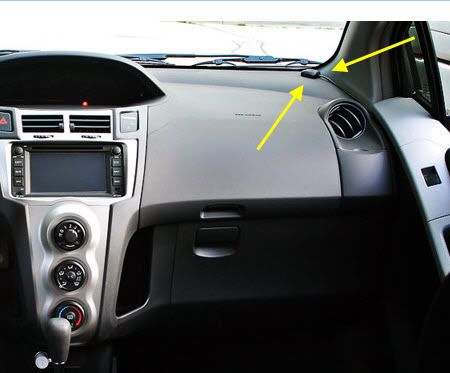
I mounted the gps antenna on top of the dashboard and not hidden underneath because I want to be certain that the satellite signals can be acquired quickly and easily by the gps.


Sound:
Though I've not yet logged many hours on this thing but for the short time I’ve had it and fiddled around with the treble/bass, I do find the sound VERY nice and it is clearly better than the stock HU the yaris had before. I keep repeating myself but It will take me a while before I can really comment in its overall performance or reliability – it does have tons of crazy features such as picture-in-picture (DVD and gps nav at same time, dual-zone display as in a remote LCD in backseat playing a movie while GPS nav running on main console LCD. It also has capabilities for a rear/backup camera, but you must buy the optional cam which you just plug into the rear of the HU camera input.

I’ll provide more comments later on… so stay tuned

-toy


.


Quote:
Originally Posted by toy_toronto View Post
Interface:
I like the general look and placement of the physical buttons on the HU bezel. As astoman mentioned, it has an OEM feel to it.. the same type of look the navigation system that my cousin's Lexus has in his SUV. The general GUI is not perfect (not even close to) in some of the menu can be a little clunky however that is to be expected on a low-cost, windows CE platform.. expect to see a few quirks here and there but it will perform the tasks it's intended to do... seems like a fun toy so far.


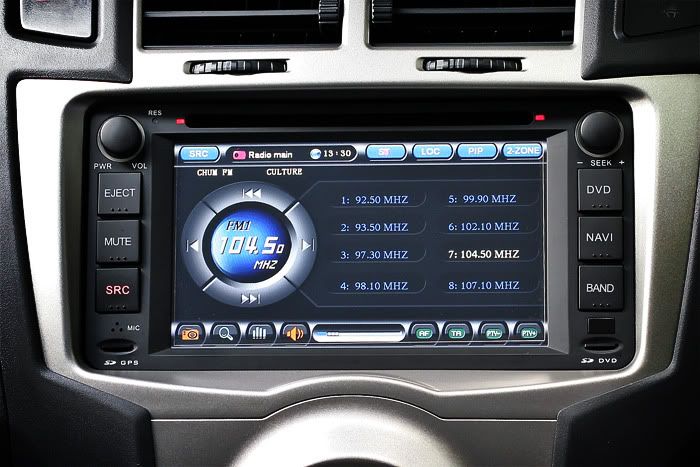
** AM/FM Radio menu interface. Preset up to 24 FM station and 8 AM station. Supports RDS such as limited radio station info, current songs title, genre, etc.


DVD/Video Playback
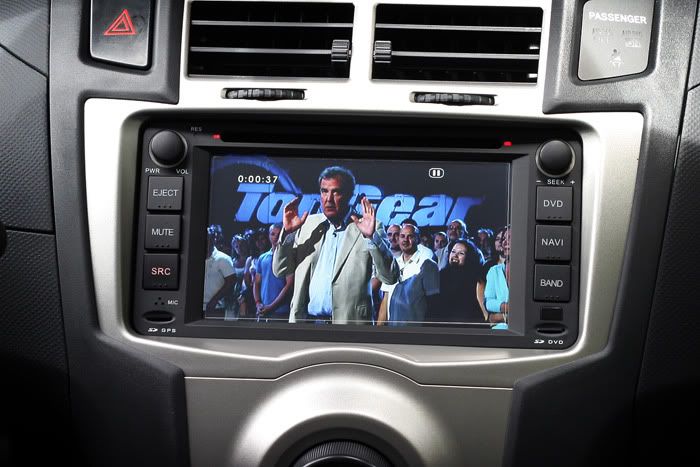
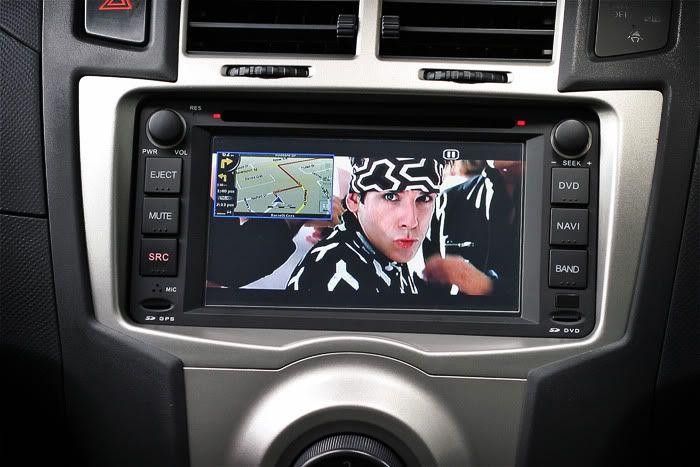
I understand some see this as a major hazard but please, no flames. I don't intend to watch DVD movies while driving --that's just plain stupid. I have a giant HD LCD screen in the basement for that purpose. It'll be used for passengers only or as I'm waiting for people in the parking lot. There are lots of variations of these things on EBay but I made sure the one I bought is capable of Picture-in-Picture.


Clarkson on Stig: "** Some say he naturally faces magnetic north, and that all his legs are hydraulic... "


GPS:
The unit came with 2GB SD card that contained the GPS software (Route 66) preinstalled. Route 66 works well, however i thought it wasn't as good as my tomtom or the iGO8 software which I replaced it with. I made a backup of the entire 2GB SD card on my hard drive first, then I formatted it to FAT32. I then copied the entire iGO8 with North America maps to the SD card. I was surprised that it picks up the GPS satellites very quickly (under 20 seconds) even the time when I still had the antenna hidden behind the glove box during the install. I used 2-sided tape and mounted the gps antenna on top of my dash as the final placement.

One big complain I have so far though is that there's way too many features but VERY LITTLE documentation. The manual that came with it is very high level and poorly written. I sort of have to fumble around the menus, drill down try to figure things out as I go along.


** Zoolander: "I'm not an ambi-turner". Below pic shows the PIP NAV screen on top of movie zoomed at 30%. Note the PIP size can be increased/zoomed up to 60% of screen


That's all I have for now and more to come later. I'll try to post some night shots to show the different backlighting options and how well it matches the yaris instrument panel LEDs. Yes, the buttons LED backlights can be changed to green, red, or orange on-the-fly whichever you prefer.


-toy


.

From daveprue:


Quote:
Originally Posted by daveprue View Post


Here is the unit installed, powered down.


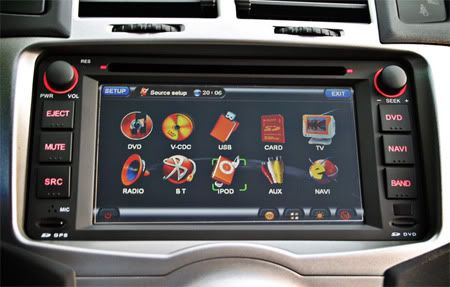
This is the Main Menu. You get this by pressing the "Source" button. One thing I really like is that at powerup, the unit goes directly to whatever mode you were in when you powered down. When I come out of the grocery store, the unit picks up playing my mp3 exactly where it was when I parked.


This is the FM Radio Mode. The reception is equal or better than my stock HU was. I am no audiophile, but the sound seems great.


This is the GPS Mode. I love that the GPS mutes the music when it gives you voice prompts. The map data is far better than my Garmin unit was, it even includes speed limit information for many roads, and (if you enable it) the voice alerts you that "You are exceeding the speed limit".


Bluetooth mode. I love it. It connects to my phone when I start the car, and disconnects when I turn the car off. My cellphone never leaves my pocket. In experimentation, I have been told that the mic "sounds a bit tinny", one friend of mine said that it might be the "little car" that is causing it...


This is PIP mode (Picture in Picture). In this instance I have the FM as the primary screen, and the PIP frame contains the GPS. You also have the ability to set "2 Zone" mode, so that you can direct one output to the video out (think headrest screens) while displaying a different mode on the main screen.


Finally, this is the mp3 mode, reading from the microSD card inserted on the lower right of the unit.


Anyway, I know this is a lot of pictures, but I tried to give a representative smattering of modes etc. If there is anything in particular that someone would like to see, let me know.

My primary worry, when buying the unit, was how "OEM" it would look installed. I really did not want weird spaces around the edge, or the faceplate not matching the bezel. If you have those worries, don't! It is at least as good a fit as the original unit.
__________________
-
Procrastinators of the world unite! ...tomorrow.


My Garage.. 'Mild' Drop & Misc..2-DIN GPS/Navi..DIY:Rear Wiper Delay..Ramps/Roll-Ups..Rain Sensing Wipers / Auto-Headlamps
toy_toronto is offline   Reply With Quote
Old 05-23-2011, 10:36 AM   #383
alex151
 
Drives: Ford Focus SW - 2009
Join Date: May 2011
Location: Italy
Posts: 2
Different car, same player, 2-zone disabled :(

Hello,
I have a Ford Focus, but the player/navigator software is just the same.
I just bought a second displyay to use the "2-zone" function (I want to use the navigator while the children in the back watch at a cartooon on the second display), but now I realize that the "2-zone" function is disabled! :(
If I click on it nothing happens, the button seems to be disabled.
Has anyone used the 2-zone function with a second display?
Do you know how could I enable it?

Last question: is there a way to update the firmware/software (not the navigation IGO software)?
From where can I download the latest release?

Many thanks and best regards to all :)

Alex.
alex151 is offline   Reply With Quote
Old 05-23-2011, 03:21 PM   #384
toy_toronto
always toyin'
 
toy_toronto's Avatar
 
Drives: 2010 5-Dr
Join Date: Apr 2010
Location: Tarrana, Canada
Posts: 472
Alex, i don't really know if anyone has actually installed a 2nd display for this hu.

On mine, the 2-zone button appears to be "active" (button can be clicked) but I don't have another display though. I went thorugh the menu settings but could not find any related to enabling/disabling this feature.

In terms of firmware updates, i've searched and found a couple of sites that offer it (sorry can't remember the links it's been a while) but reading through their forums most have been unsuccessful and/or have ended up with 'bricked' units.

If you find a working solution pls do comeback and share what you find =)

-toy
__________________
-
Procrastinators of the world unite! ...tomorrow.


My Garage.. 'Mild' Drop & Misc..2-DIN GPS/Navi..DIY:Rear Wiper Delay..Ramps/Roll-Ups..Rain Sensing Wipers / Auto-Headlamps
toy_toronto is offline   Reply With Quote
Old 05-24-2011, 08:29 AM   #385
SKurj
 
Drives: 09 Yaris 3dr HB, BRZ
Join Date: Mar 2011
Location: GTA
Posts: 222
Yes Toy, nothing bounces in the Spectrum screen. I think it did the once.. and only once.. I think the first time i went to the spectrum screen they bounced until i tapped the screen again.
SKurj is offline   Reply With Quote
Old 05-24-2011, 09:57 AM   #386
alex151
 
Drives: Ford Focus SW - 2009
Join Date: May 2011
Location: Italy
Posts: 2
Quote:
Originally Posted by toy_toronto View Post
Alex, i don't really know if anyone has actually installed a 2nd display for this hu.
However thanks for the reply :)

Quote:
Originally Posted by toy_toronto View Post
On mine, the 2-zone button appears to be "active" (button can be clicked) but I don't have another display though.
What happens if you click on it?

Quote:
Originally Posted by toy_toronto View Post
I went thorugh the menu settings but could not find any related to enabling/disabling this feature.
That's my same problem.

Quote:
Originally Posted by toy_toronto View Post
In terms of firmware updates, i've searched and found a couple of sites that offer it (sorry can't remember the links it's been a while) but reading through their forums most have been unsuccessful and/or have ended up with 'bricked' units.
OK, for the moment it's better to not to change it ;)

Quote:
Originally Posted by toy_toronto View Post
If you find a working solution pls do comeback and share what you find =)
Sure I will do it =)
alex151 is offline   Reply With Quote
Old 05-25-2011, 06:24 PM   #387
SKurj
 
Drives: 09 Yaris 3dr HB, BRZ
Join Date: Mar 2011
Location: GTA
Posts: 222
Maybe this weekend I will have a go and try resetting the unit and see if I can get the spectrum to work.

Next question... with PIP i don't have the option to display the radio in the small window and navi in the large (can display everything else). Is that the norm?

I can do radio large, navi small

Should add I cannot get radio to play with Navi large at all.
SKurj is offline   Reply With Quote
Old 05-25-2011, 10:48 PM   #388
toy_toronto
always toyin'
 
toy_toronto's Avatar
 
Drives: 2010 5-Dr
Join Date: Apr 2010
Location: Tarrana, Canada
Posts: 472
Let us know how you make out... just in case, the reset hole/button is in the top left hand corner beside the VOL knob.

BTW, did you check to make sure the spectrum analyzer option wasn't disabled?


-toy
__________________
-
Procrastinators of the world unite! ...tomorrow.


My Garage.. 'Mild' Drop & Misc..2-DIN GPS/Navi..DIY:Rear Wiper Delay..Ramps/Roll-Ups..Rain Sensing Wipers / Auto-Headlamps
toy_toronto is offline   Reply With Quote
Old 05-26-2011, 07:43 AM   #389
SKurj
 
Drives: 09 Yaris 3dr HB, BRZ
Join Date: Mar 2011
Location: GTA
Posts: 222
Yes its not disabled

Ahh the reset hole.. thanks I was thinking I would just disconnect the battery for a minute. That solution looks better.
SKurj is offline   Reply With Quote
Old 05-26-2011, 09:25 AM   #390
djct_watt
 
Drives: 2010 NCP91 5spd
Join Date: Nov 2009
Location: Thailand
Posts: 449
Oh god will this thread ever die! Unsubscribe! unsubscribe!
__________________
The best modification you can make is between the steering wheel and driver's seat.
djct_watt is offline   Reply With Quote
Old 05-26-2011, 01:11 PM   #391
SKurj
 
Drives: 09 Yaris 3dr HB, BRZ
Join Date: Mar 2011
Location: GTA
Posts: 222
Well I tried the reset, not quite a true reset, looks like the unit maintains all my settings.
The first time i open the spectrum screen after reset the things bounce for a split second then come to rest and never move again...

Meh not a big issue.
SKurj is offline   Reply With Quote
Old 06-21-2011, 02:33 PM   #392
brendan
 
brendan's Avatar
 
Drives: toyota yaris
Join Date: Jul 2010
Location: south africa
Posts: 54
Hi, I have received mine today. Where must I connect the "brake detection" "back detection" and "AMP control" cables? It's the 3 seperate cables coming from the power plug. And also I don't know if anyone of you have the reverse camera, but there is a short red cable connected to each end of the AV cable that connects the camera to the unit. Where must this be connected?

Thanks for the help
Brendan
__________________
brendan is offline   Reply With Quote
Old 06-22-2011, 04:48 PM   #393
toy_toronto
always toyin'
 
toy_toronto's Avatar
 
Drives: 2010 5-Dr
Join Date: Apr 2010
Location: Tarrana, Canada
Posts: 472
Quote:
Originally Posted by brendan View Post
Hi, I have received mine today. Where must I connect the "brake detection" "back detection" and "AMP control" cables? It's the 3 seperate cables coming from the power plug. And also I don't know if anyone of you have the reverse camera, but there is a short red cable connected to each end of the AV cable that connects the camera to the unit. Where must this be connected?

Thanks for the help
Brendan
Brendan it's been a while since I installed mine and I can't even recall what the connections at the back looked like, lol.

All I remember was it was plug n play (toyota harness) and took me like 15 minutes to hook everything up. I don't think those cables you're referring to needs to be connected (likely they're to prevent dvd playback when driving, etc.). I think I just left mine unconnected and zip tied them at the back.


-toy
__________________
-
Procrastinators of the world unite! ...tomorrow.


My Garage.. 'Mild' Drop & Misc..2-DIN GPS/Navi..DIY:Rear Wiper Delay..Ramps/Roll-Ups..Rain Sensing Wipers / Auto-Headlamps
toy_toronto is offline   Reply With Quote
Old 06-23-2011, 02:40 PM   #394
2009BBPliftback
 
2009BBPliftback's Avatar
 
Drives: 2009 Yaris LB in Blazing blue
Join Date: May 2009
Location: Western PA (Franklin)
Posts: 237
Send a message via AIM to 2009BBPliftback
Can anyone recommend an amazon seller for this item? I'm a little nervous I want to make sure I get one from a reputable seller..
2009BBPliftback is offline   Reply With Quote
Old 08-01-2011, 06:06 PM   #395
Spidermandud
 
Spidermandud's Avatar
 
Drives: Black '08 Yaris Hatch S
Join Date: Aug 2011
Location: Johnson City, Tennessee
Posts: 320
Quote:
Originally Posted by 2009BBPliftback View Post
Can anyone recommend an amazon seller for this item? I'm a little nervous I want to make sure I get one from a reputable seller..
Not amazon, but these are fairly priced.

http://www.autodvdgps.com/car-dvd-gp...ies-p-565.html
Spidermandud is offline   Reply With Quote
Old 08-19-2011, 01:04 PM   #396
BennyLava
 
Drives: 1987 Silverado
Join Date: Jan 2010
Location: Texas
Posts: 314
Anyone know exactly how many millimeters the opening for a 2009 double din unit is? I am wondering if the unit that the OP put in, will fit in my car.
BennyLava is offline   Reply With Quote
Reply


Posting Rules
You may not post new threads
You may not post replies
You may not post attachments
You may not edit your posts

BB code is On
Smilies are On
[IMG] code is On
HTML code is Off

Forum Jump

Similar Threads
Thread Thread Starter Forum Replies Last Post
ACRONYM thread Shroomster Off-topic / Other Cars / Everything else Discussions 45 02-15-2025 11:30 PM
Electrical System Upgrade Advice sqcomp In Car Entertainment + Electronics (audio / video / alarm) 6 03-23-2016 02:15 AM
Used Kenwood 7037 Double Din Touch Screen +10 Disc Changer ! micquek Items for Sale by private party 0 12-31-2009 09:31 AM
Getting ready to get a DOUBLE DIN touch screen player, NEED INPUT! Syroyizhka General Yaris / Vitz Discussion 12 04-08-2009 11:26 PM
Decent eBay deal on harness and double DIN kit Sodium Duck In Car Entertainment + Electronics (audio / video / alarm) 6 03-23-2009 01:04 AM


All times are GMT -4. The time now is 05:40 AM.


YarisWorld
Powered by vBulletin® Version 3.8.11
Copyright ©2000 - 2025, vBulletin Solutions Inc.